



Time Tracking Directly in Jira — No Interruptions, No Context Switching
Developers and project teams spend the majority of their workday in Jira. Prioritizing tasks, updating statuses, writing comments — Jira is the backbone of the workflow. And then comes that moment when time tracking calls: switch tabs, open another tool, find the right project, log the hours. Then back to Jira — and the train of thought is gone.
Everyone who works with both tools daily knows this friction. And that’s exactly why we built the Fritto Jira Plugin.
The Problem: Two Tools, Two Worlds
Time tracking and project management are inseparable — yet most solutions treat them as completely separate processes. This creates familiar disadvantages:
- Context switching costs time and focus — jumping between Jira and a time tracking tool breaks concentration every single time.
- Manual assignment is prone to errors — finding the right project, matching the correct task, maintaining duplicate entries.
- Entries get forgotten — who can accurately recall after a long sprint how much time they spent on which ticket?
- Data goes out of sync — work logs in Jira and time entries in the tracker end up showing different numbers.
The Solution: Fritto Directly in Jira
The Fritto Jira Plugin integrates seamlessly into your familiar Jira interface. No new tab, no tool switch — time tracking appears directly inside the Jira task, right where the work happens.
Time Tracking Without Leaving the Task
Open any Jira ticket — the Fritto Time Tracker block is already there. Select a date, enter your hours, choose a project, add a description, save. Done.
Automatic Sync with Fritto
Every entry logged via the plugin is automatically created as a time record in Fritto and simultaneously saved as a work log in Jira. Both systems stay in sync at all times — no manual duplication required.
Always in View: How Many Hours Have Already Been Logged
The plugin displays directly in the ticket how many hours you have already logged for this task. No switching to reports, no mental math — the status is visible at a glance.
Installation: Set Up Fritto in Jira — in a Few Clicks
The Fritto Jira Plugin is available on the Atlassian Marketplace and can be set up without any technical effort. Everything starts on the Jira homepage.
- Click on Apps in the top Jira navigation.
- Select Explore more apps — the Atlassian Marketplace opens.
- Type Fritto Time Tracker in the search bar and open the app page.
- Click Try it free.
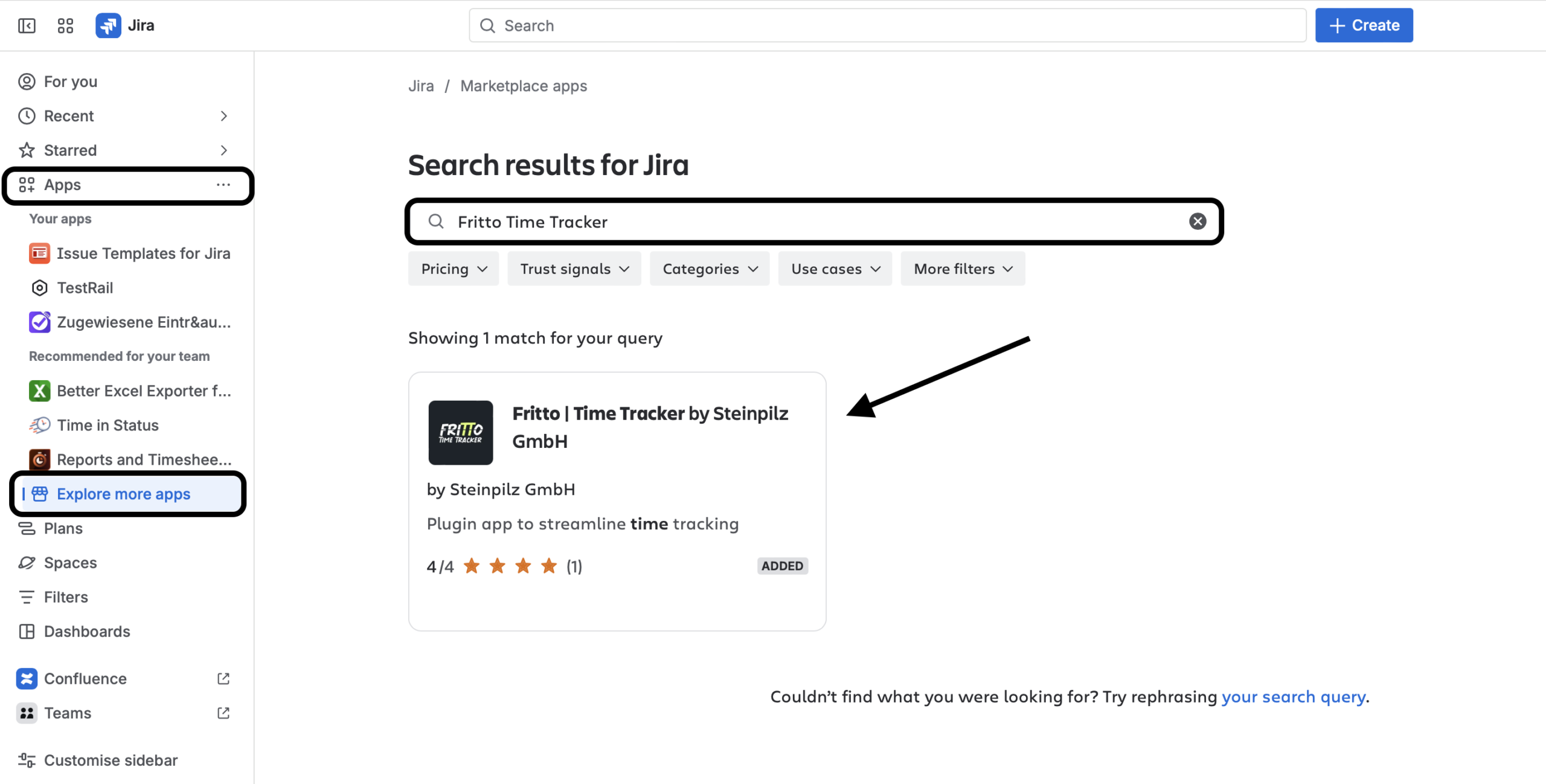
If you are the admin of your Jira instance, the plugin is installed immediately and ready to use. If you are not an admin, the option Submit request appears after clicking — this automatically sends the request to your Jira administrator.
Setup: First Steps After Installation
Logging In to the Plugin
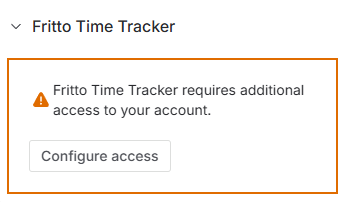
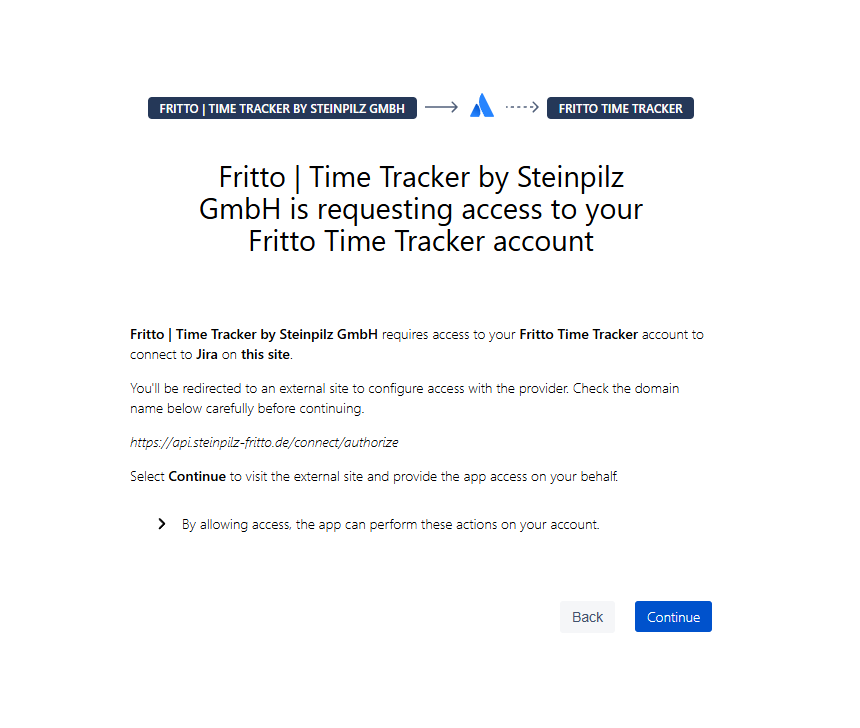
After installation, the Fritto Time Tracker block appears in every Jira task. On the first use, you will be prompted to connect your Fritto account. Once connected, the session stays active.
Logging Time — Right After Login
After signing in, you see the entry form directly inside the ticket:
- Date — today by default, freely selectable
- Time spent — manual entry in HH:MM format
- Project — required field, select from your assigned Fritto projects
- Description — optional free text
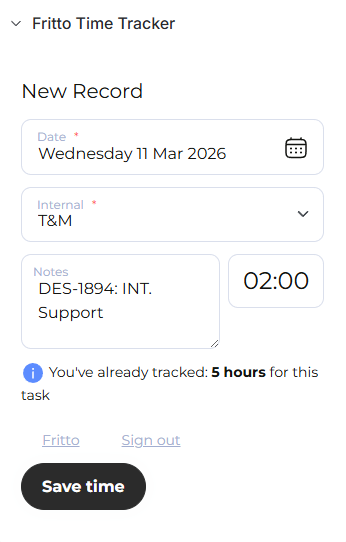
The link to the current Jira task is set automatically. The plugin also shows how many hours you have already logged for this ticket.
Setting Up Automatic Project Assignment (for Admins)
The plugin can pre-select the matching Fritto project automatically. To enable this, an admin needs to set up a custom field Fritto project at the Jira project level and enter the value in the format ClientName-ProjectName — for example Internal-T&M. The plugin reads this value and pre-selects the project automatically.
If the field is empty at the ticket level, the plugin automatically checks the parent Epic — so the assignment also works for all subtasks without having to configure each ticket individually.
Who Benefits Most from the Plugin?
- Development teams who work in Jira daily and need to track time per sprint and ticket.
- Project managers who want a clear view of hours worked and remaining estimates — without switching between tools.
- IT agencies that differentiate billable hours by client and project and want to log them directly from Jira.
- Scrum teams for whom accurate work logs are essential during sprint reviews and retrospectives.
Fritto + Jira: Time Tracking That Stays Out of the Way
The goal of the Fritto Jira Plugin is not to replace Jira. It’s about bringing time tracking to where the work actually happens — and making it simple enough that it requires no extra effort.