You’re looking for an Excel time tracking template that just works: enter your start time, enter your end time, subtract the break, done. Finding a template isn’t the hard part – Google returns hundreds. The hard part is that most are either too basic (no break rules, no projects) or so overloaded that nobody on the team fills them in willingly.
We looked at common templates and picked three that are actually useful in 2026 – each for a different need. At the end, we’ll be honest about where Excel reaches its limits and what an alternative can look like.
In short: for a quick start, the templates built into Excel are enough. If you need to track time under German working time law, including the break rules, a German monthly template is the better fit. And if you want to switch freely between weekly, biweekly and monthly periods, Vertex42 has you covered.
What a good Excel time tracking template needs
Before we get to the templates: what makes a good one? Since the 2022 ruling of Germany’s Federal Labour Court, employers in Germany are required to record their employees’ working hours. The law doesn’t yet specify exactly how. So an Excel sheet is generally acceptable – as long as it captures the key information reliably. For the legal background, see our article Time tracking in Germany: what companies really need to know.
A usable template should cover at least the following:
Start, end and duration of each working day
Breaks – ideally deducted automatically
Weekly or monthly totals, preferably in decimal hours (8.5 instead of 8:30)
Overtime or a target-vs-actual comparison
Optional: a project or client column if you bill hours onward
Three Excel templates put to the test
1. Microsoft’s templates, right inside Excel
Best for: Individuals and small teams who want to start right away.
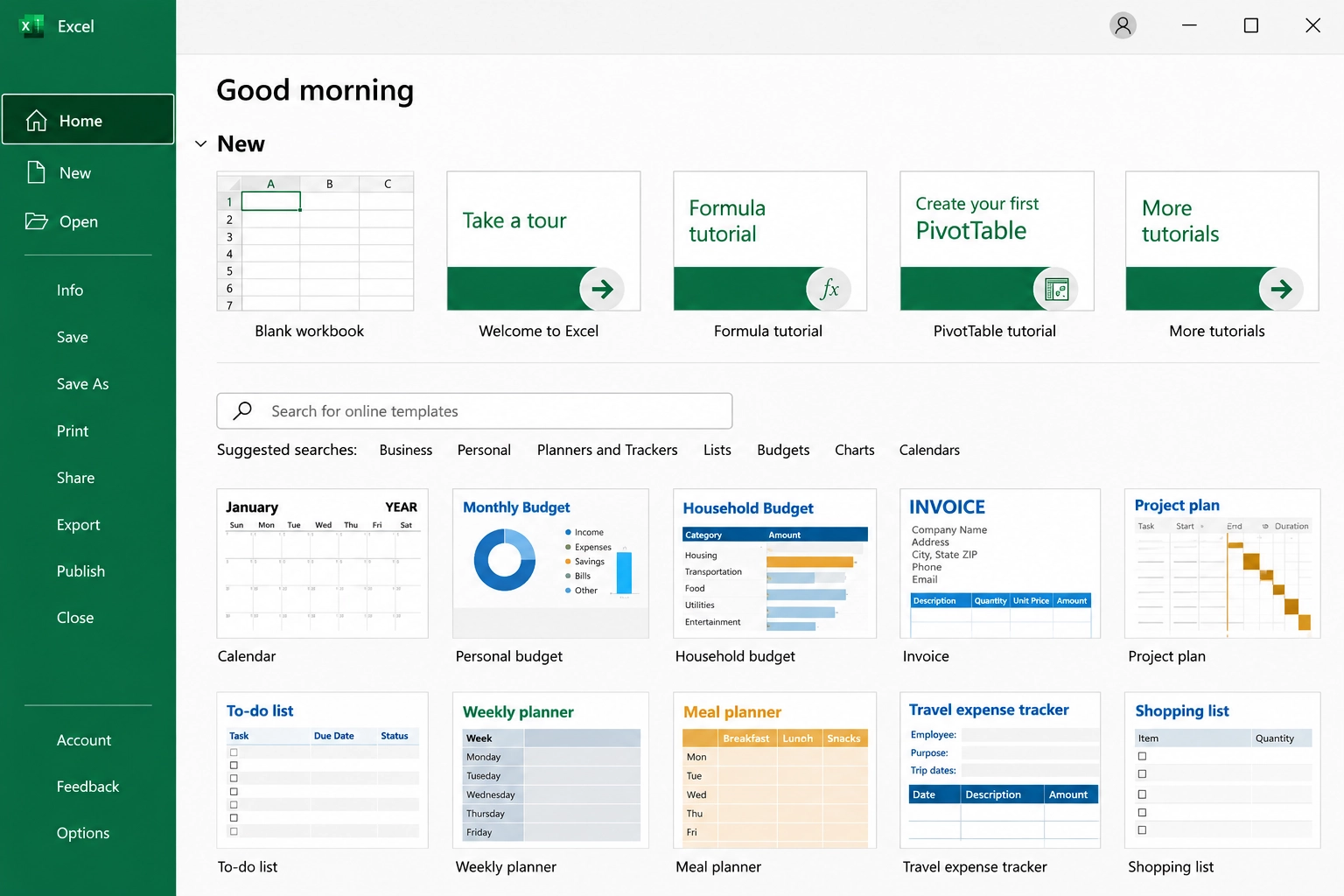
The most obvious option is often overlooked: Excel ships with its own templates. In Excel, go to File → New and search for “timesheet” or “time card”. You’ll find several variants, usually a weekly view with columns for regular hours, overtime, vacation and sick days. Depending on the template, you can also add an hourly rate.
Timesheet template from Excel (File → New)
What’s good: No downloads from third-party sites, clean design, works in Excel for the web too. You’re ready in two minutes.
Where it falls short: The templates are built for an international audience. German break rules – 30 minutes once you’ve worked more than six hours, 45 minutes once you’ve gone past nine – aren’t included. You’ll usually have to add a project or client column yourself.
2. Stundenzettel 2026 by WHK Controlling
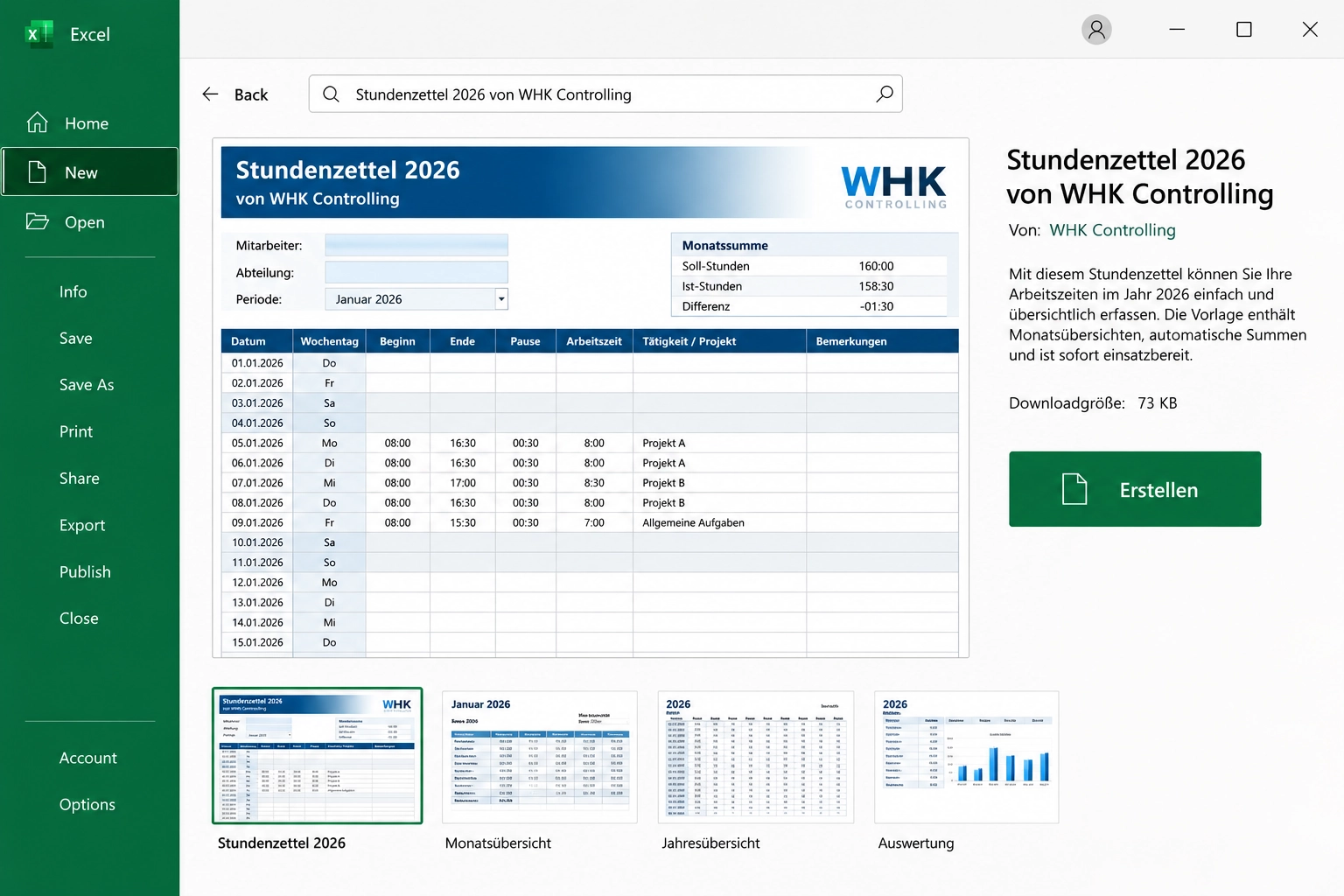
Best for: German companies that need to track time under the Working Hours Act (ArbZG) and assign hours to projects.
The template from WHK Controlling, a Frankfurt-based corporate finance consultancy, is clearly designed for day-to-day work in Germany. It records start, end and break, calculates net working time automatically in decimal hours, and includes columns for activity and project number. On top of that, you get cumulative hours, a monthly summary and an annual sheet comparing target and actual hours.
Stundenzettel 2026, source: WHK Controlling
What’s good: ArbZG break rules built in, project column already included. Download without registration.
Where it falls short: One file per person. As soon as several employees track time, you’ll have to merge the files by hand at the end of each month. German labels only – fine for German teams, worth noting if you have international colleagues.
3. Vertex42 Timesheet Template
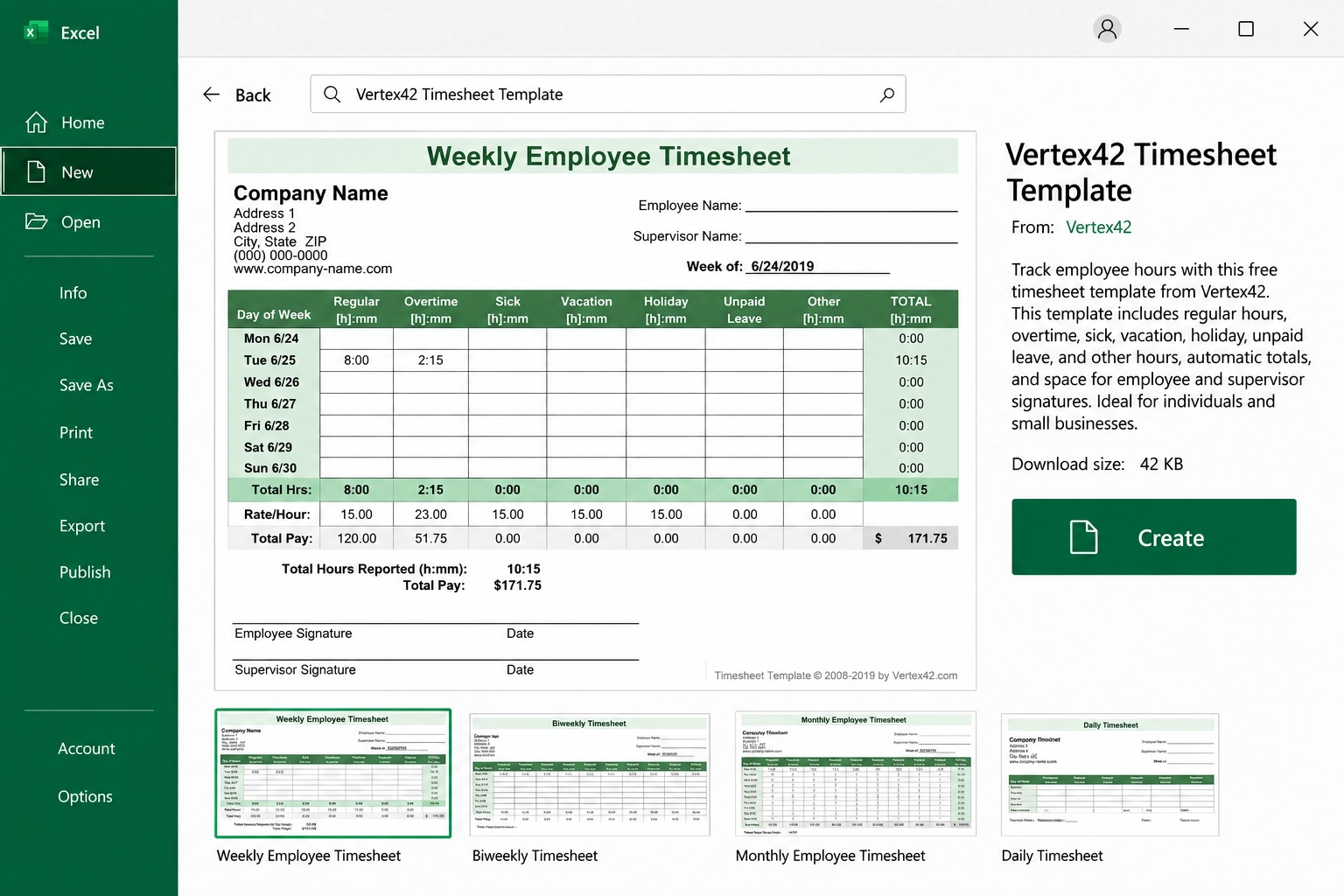
Best for: Teams with different billing periods and anyone who also works in Google Sheets.
Vertex42 is one of the best-known sources of Excel templates worldwide. Its timesheet template comes in weekly, biweekly and monthly versions. You record clock-in and clock-out with up to two breaks per day, in decimal or hours-and-minutes format. Overtime can be calculated automatically – after eight hours per day, after 40 hours per week, or both.
Timesheet Template, source: Vertex42
What’s good: Very flexible, works in Excel 2007 and later, Google Sheets and OpenOffice. The formulas are clean and easy to follow.
Where it falls short: The overtime logic follows US rules. For use in Germany, you should adjust the overtime thresholds. The license allows you to use the template, but not to redistribute it.
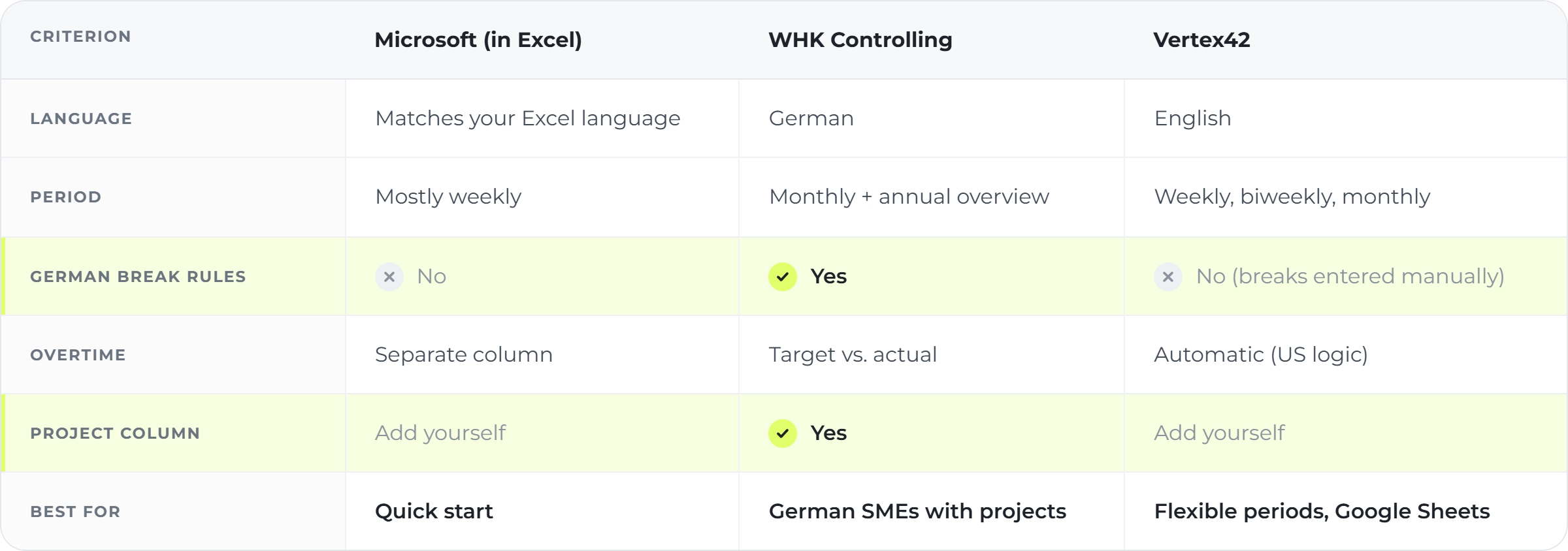
The three templates compared
How to get more out of any template
Whichever template you choose, a few tweaks make it far more robust:
Dropdowns instead of free text: Set up clients and projects as a list via Data → Data Validation. That way nobody ends up typing “Client A”, “ClientA” and “Cl. A” side by side.
Protect formula cells: Lock all cells containing formulas with sheet protection. Otherwise, an accidentally overwritten break deduction may only surface weeks later.
One file per month: Use consistent file names, for example 2026-10_Lastname.xlsx. It saves a lot of searching when you merge files.
Decimal hours for billing: For invoices and payroll, 7.75 is easier to work with than 7:45.
We’ve also collected the most common pitfalls of Excel time tracking in a separate article.
When Excel reaches its limits
For one person or a small team, a good Excel template works reliably for a long time. Things usually get difficult in three places:
Multiple files: Five employees means five timesheets. At the end of the month, someone has to combine everything – often several hours of work.
Later changes: In Excel, any cell can be overwritten at any time without showing when or by whom. That’s not a strong position in an audit.
What’s coming legally: On 18 June 2026, Germany’s Federal Ministry of Labour and Social Affairs (BMAS) presented a draft bill to reform the Working Hours Act. It calls for electronic recording on the same day, with transition periods depending on company size, and explicitly mentions spreadsheets as one possible solution. However, the draft hasn’t been passed yet – details may still change.
Fritto as an alternative – or an addition
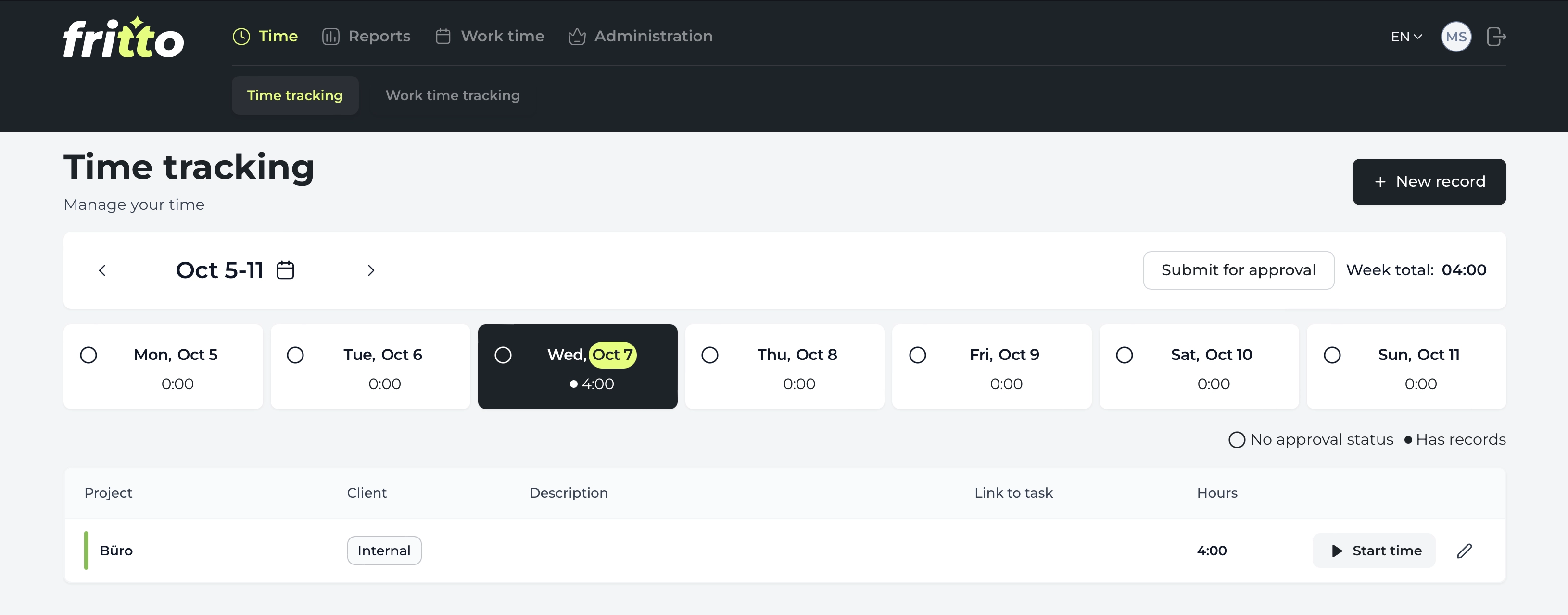
If you notice that merging files at month-end takes more time than the actual tracking, it’s worth looking at a time tracking tool. Fritto is one of them, built by Steinpilz in Kirchheim unter Teck, Germany.
The difference from an Excel template: everyone tracks their time in Fritto – in the browser, directly in a Jira ticket, or even through an AI assistant like Claude that logs the time itself. Clients and projects come from a fixed list, changes stay traceable, and team-wide reports are ready at month-end in a few clicks. The data is stored on servers in Germany.
Team-wide reports in Fritto: all hours by client and project at a glance
And you don’t have to give up Excel. With the Excel connection via Office Scripts, Fritto data flows into your existing template at the click of a button – your formulas and invoice layouts stay, only the manual typing disappears. How the options compare in practice is shown in our comparison Excel, Fritto or both?.
Conclusion
An Excel template is a good starting point for many teams. Microsoft’s template is enough for a quick start, WHK Controlling’s template is the best fit for German companies with project work, and Vertex42 stands out for its flexibility. What matters most is that your team actually uses the template every day.
When the team grows and month-end consolidation becomes a routine nobody likes, a tool like Fritto is the next step – with or without Excel behind it.