You’ve probably got the tabs open already: Toggl in one, Clockify in the next, and your own to-do list somewhere with “finally sort out time tracking” on it. Both tools are well known, both have loyal users — and both structure their feature set across four to six pricing tiers.
We looked at the current pricing pages and help documentation for Toggl Track and Clockify and compared them based on their public information: price, setup, data location, AI integration, and access roles. Sources and prices as of the reference date included.
Short version: Toggl and Clockify are solid, established tools. The difference is what you have to pay to get features that come standard with Fritto from day one — and where your data actually ends up.
Price comparison
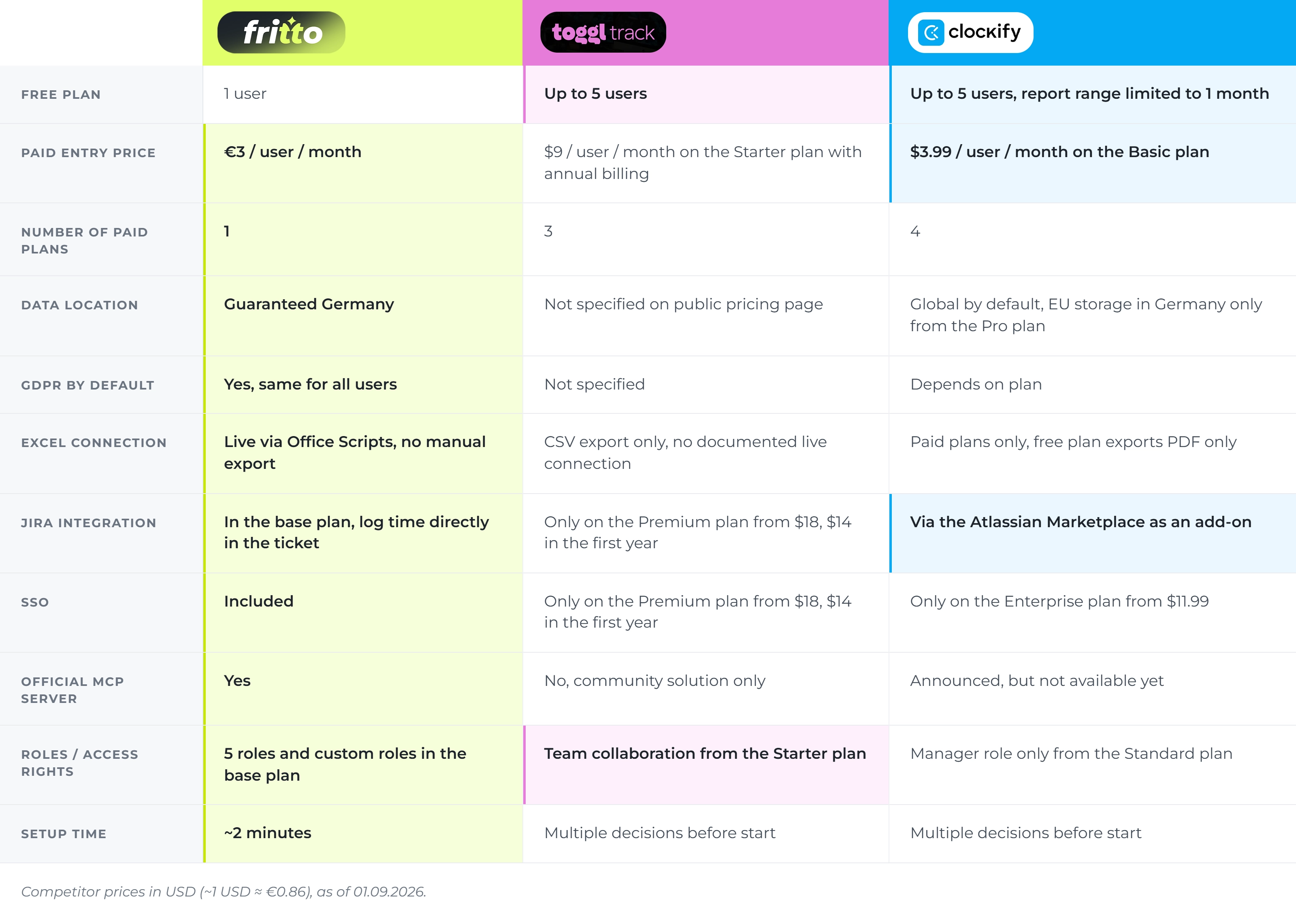
All three tools offer a free entry point. Things get interesting once a team grows and needs real functionality — billing, approvals, integrations. Competitor prices are listed in US dollars (as of August 31, 2026, roughly 1 USD ≈ 0.86 €):
Fritto: One price, no tiers. The first user is free, every additional user costs €3 a month — with every feature included from day one.
Clockify: Free to use for up to 5 people, though the data range is capped at one month. The cheapest paid plan (Basic) starts at $3.99 per user per month. If you want to choose your own data region, you need at least the Pro plan from $7.99; SSO is only available on the Enterprise plan from $11.99.
Toggl Track: Free to use for a limited number of users. The entry-level paid plan (Starter) costs $9 per user per month. Jira integration, single sign-on, and approval workflows are only included from the Premium plan — $18 per user per month ($14 in the first year with annual billing).
Prices as of August 31, 2026 — see the source note at the end of the article for current figures.
The difference is structural: with Toggl and Clockify, you pay more to unlock things like approvals, SSO, or a specific data region. With Fritto, every feature is included in the single €3 price.
Setup time comparison
Before you even start your first timer on Toggl or Clockify, you make several decisions: which of four to six plans, whether to pay annually or monthly, and with Clockify, whether you’re even allowed to pick a data region (Pro plan and up only). None of this is difficult — but it’s not two minutes either.
With Fritto, there’s only one plan — no tier to pick, no extra decision. Setup takes about two minutes. The first user is free, every additional one costs €3.
Feature comparison
Data & server location
Fritto stores all data on servers in Germany, GDPR-compliant, the same for every user. Toggl (Toggl OÜ, Estonia) makes no guarantee about a specific server location on its public pricing page. Clockify stores data in a global region by default — choosing “EU (Germany)” as your data region is only possible from the Pro plan onward.
AI agents & MCP
Fritto has an official, maintained MCP server: Claude and other AI assistants log time directly, no third-party detour required. Clockify has announced its own MCP server, marked “Coming Soon” in its help documentation as of August 31, 2026. As of the same date, Toggl does not yet have an official MCP server — users rely on unofficial community solutions, and a corresponding feature request has been open since February 2026.
Jira integration
With Fritto, it’s part of the base plan: log time directly in the ticket, no context switch. With Toggl, native Jira integration is only included from the Premium plan. Clockify offers a Jira integration through the Atlassian Marketplace, independent of the core pricing tier.
Excel connection
Fritto offers a live connection via Office Scripts — time data stays current at the push of a button, no manual CSV export. Clockify’s free plan only exports as PDF; CSV export requires a higher tier. Toggl offers CSV export, but a live connection like Fritto’s is not documented.
Roles & access rights
Fritto ships with five roles, plus custom ones — everyone sees only what they need. Clockify only offers a dedicated Manager role from the Standard plan up. Toggl includes “Team Collaboration” in the Starter plan, with finer permission controls reserved for higher tiers.
At a glance
Summary: who fits whom?
Toggl Track → a solid choice if you mainly need project time for reports and don’t need Jira or SSO right away
Clockify → makes sense if you want to onboard many users cheaply and data region or AI integration aren’t (yet) a priority
Fritto → built for teams that want GDPR certainty, AI-native workflows, and Jira integration without tier‑hopping
Details on Toggl Track and Clockify are based on the providers’ public pricing and help pages as of August 31, 2026 — prices tend to shift more often than feature sets or plan structure. For current figures, check directly with Toggl and